The Best Sublimation Printer Under $500
This is the bracket where the conversion stops being the only option. Under $500 you can buy a printer that arrives as a sublimation printer, with its warranty intact.
Heads up: Mat & Blade earns a commission from qualifying purchases made through the links on this page, at no extra cost to you. It never changes which products we recommend or how we rank them. Read the full disclosure.
The Epson SureColor F170 is the best sublimation printer under $500, because it is the cheapest printer in this bracket that Epson actually sells AS a sublimation printer — it arrives ready, uses Epson's own sublimation ink and keeps its warranty. The budget pick is the Epson EcoTank ET-2800, which is far cheaper and is the printer most people start on, with the honest catch that it is a conversion rather than a sublimation printer. If print size is your limit rather than support, the EcoTank ET-15000 fits under the same ceiling and prints up to 13 x 19 in.
Quick picks
| # | Product | Best for | Price |
|---|---|---|---|
| 1 | 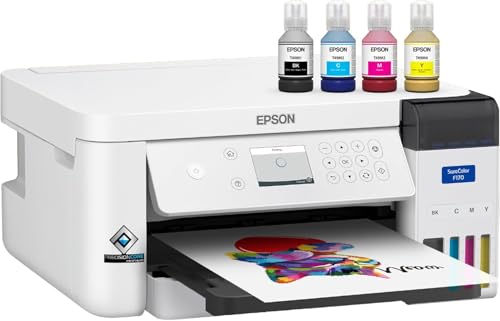 Epson SureColor F170The lowest-priced printer sold as a dye-sublimation machine rather than converted into one — the honest ans... | The overall pick — the cheapest printer Epson sells AS a sublimation printer | $439.99 · View on Amazon Price as of November 28, 2026 #ad · affiliate link · we never show a price we cannot verify |
| 2 | 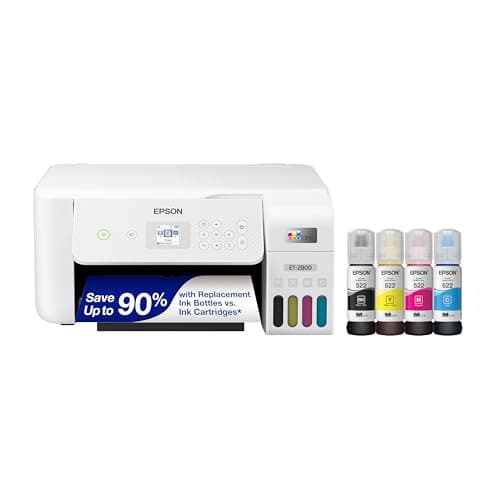 Epson EcoTank ET-2800The printer most people convert — cheap, refillable, and widely documented. Read the warranty section befor... | The budget pick — the cheapest route into sublimation, with a catch | $239.99 · View on Amazon Price as of November 28, 2026 #ad · affiliate link · we never show a price we cannot verify |
| 3 | 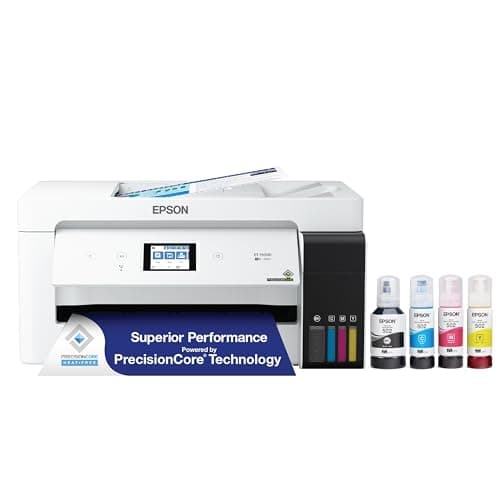 Epson EcoTank ET-15000The wide-format version of the printer everyone converts — it prints up to 13 by 19 inches through the rear... | Wide-format transfers — 13 x 19 in, inside the bracket | $449.99 · View on Amazon Price as of November 28, 2026 #ad · affiliate link · we never show a price we cannot verify |
| 4 | 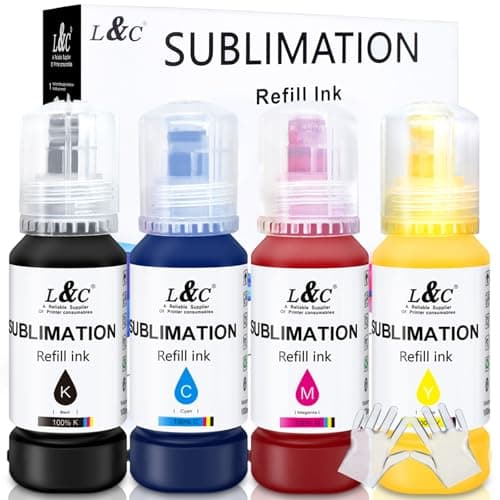 Third-Party Sublimation InkThe ink that makes an EcoTank conversion work, and the exact thing that puts the printer outside Epson's in... | The consumable the conversion route depends on | $18.39 · View on Amazon Price as of November 28, 2026 #ad · affiliate link · we never show a price we cannot verify |
| 5 | 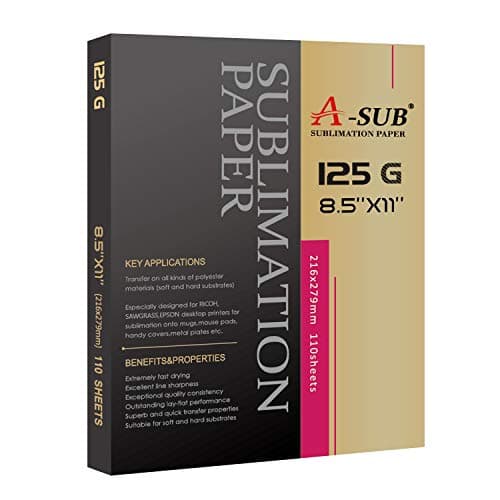 A-SUB Sublimation PaperThe paper most beginners land on, and a sensible default: high transfer rate, dries fast enough to handle, ... | The other half of a print, on any printer in the bracket | $16.79 · View on Amazon Price as of November 28, 2026 #ad · affiliate link · we never show a price we cannot verify |
Tap any row to jump to the full write-up. Prices come from Amazon on the date stamped on each button and can change after that — check the listing before you buy.
Converted or dedicated: the only decision that matters here
Both kinds of printer sit in this bracket, they make broadly comparable prints, and they are completely different purchases. The honest framing is not quality, it is who owns the risk.
| Dedicated (SureColor F170) | Converted (EcoTank) | |
|---|---|---|
| Sold as a sublimation printer | Yes | No — it is an office inkjet |
| Warranty on sublimation use | Epson's standard one-year unit exchange | Epson's warranty covers genuine ink, not third-party ink |
| Ink | Epson T49M sublimation ink | Third-party refill bottles you choose |
| Running cost per print | Higher — proprietary ink | Lower — refill bottles |
| Colour accuracy out of the box | Epson's own profile | Depends on the ink maker's ICC profile |
| Reversible | Not applicable | No — a converted printer stays converted |
| Max print width | 8.5 in | 8.5 in, or 13 x 19 in on the ET-15000 |
1. Best for the overall pick — the cheapest printer epson sells as a sublimation printer
Epson SureColor F170
Epson · Currently sold · Verified 2026-10-29
The best sublimation printer under $500 and the single reason this bracket exists as a buying decision. Everything cheaper is a regular inkjet that somebody converts; this is a dedicated dye-sublimation printer that arrives ready, with Epson's own T49M sublimation ink going into its reservoir and Epson's standard one-year unit exchange warranty covering it — which the conversion route voids by definition, because Epson's warranty does not cover damage from third-party ink. Epson states 8.5 in maximum paper width and up to 1200 x 600 dpi, with USB, Wi-Fi, Wi-Fi Direct and Ethernet. For anyone selling, or anyone who simply does not want their printer to be a project, this is the pick. Honest cons: 8.5 in width means letter-size transfers, so tumblers, mugs and shirt fronts yes, oversized prints no; the ink is Epson's own and priced accordingly, so running cost per print is higher than a refilled EcoTank; and it is a single-function printer with no scanner or copier.
What works
- Sold and warranted as a sublimation printer, so nothing about it is a workaround
- Refillable ink bottles rather than cartridges, so ink cost per page stays low
- Epson supplies the sublimation print software and profiles itself
- Costs substantially less than the Sawgrass machines it competes with
What does not
- Epson's own published resolution is lower than a converted photo EcoTank's
- Same 8.5 in width limit as the cheap convertible route
- One year of warranty, where Sawgrass publishes three on the SG500
- Stock comes and goes — Epson's own store has shown it out of stock
Not for you if
Your budget genuinely stops at $200. This is not a sub-$200 printer, and pretending otherwise is how people end up disappointed.
Key specs
- Type
- Dedicated dye-sublimation printer
- Max paper width
- Epson states 8.5 in; printable length limited by the application and driver
- Resolution
- Epson states a maximum of 1200 x 600 dpi
- Ink
- Four-color C/M/Y/K Epson T49M dye-sublimation ink bottles into a reservoir
- Connectivity
- Hi-Speed USB, Wi-Fi 802.11 b/g/n, Wi-Fi Direct and 10/100 Ethernet
- Warranty
- Epson lists a standard one-year unit exchange with phone support
Price as of November 28, 2026
#ad · affiliate link · we never show a price we cannot verify
2. Best for the budget pick — the cheapest route into sublimation, with a catch
Epson EcoTank ET-2800
Epson · Currently sold · Verified 2026-09-27
Named the budget pick because it is comfortably the least expensive printer in this bracket and the cheapest way to make a sublimation print at all, which is why it is the machine most beginners actually start on. It is sold as an ordinary refillable-tank inkjet; the sublimation setup involves filling those tanks with third-party sublimation ink from new, before any regular ink has been through the system. It prints letter-width transfers, which covers shirts, mugs and tumblers. Honest cons, and they are the whole decision: Epson does not sell or support this as a sublimation printer, and its warranty covers damage from genuine ink rather than third-party ink, so the conversion is yours to own; the conversion is one-way, because a converted printer stays converted; and colour accuracy depends on getting an ICC profile from your ink maker rather than on the printer.
What works
- By far the cheapest way to start sublimating
- Refillable tanks mean low running cost once converted
- Very widely documented by the crafting community
What does not
- Converting it with third-party sublimation ink voids Epson's coverage for ink-related damage
- A converted printer cannot go back to regular ink
- 8.5 in width limits you to letter-size transfers
Not for you if
You want a supported, warrantied sublimation setup you can call for help on. Buy a dedicated sublimation printer instead.
Key specs
- Type
- Refillable-tank inkjet — sold as a regular printer
- Sublimation
- Not a sublimation printer as sold; people convert it
- Max print width
- 8.5 in (letter)
- Ink system
- Four refillable tanks
- Warranty note
- Epson's warranty covers damage from genuine ink, not third-party ink
Price as of November 28, 2026
#ad · affiliate link · we never show a price we cannot verify
3. Best for wide-format transfers — 13 x 19 in, inside the bracket
Epson EcoTank ET-15000
Epson · Currently sold · Verified 2026-09-29
The pick if print size is the constraint rather than support. It is the same conversion story as the ET-2800 but with a far bigger sheet: Epson lists up to 13 x 19 in through the rear feed and borderless up to 11 x 17 in, which is the difference between a shirt-front transfer and an all-over or oversized design, and between one sheet and a tiled pair. That it fits under $500 at all is the interesting fact about this bracket — wide format usually starts well above it. Honest cons: it is a conversion, so the warranty caveat and the one-way nature of the change both apply; it is physically large and heavy for a craft bench; and a bigger transfer needs a press platen big enough to use it, which is a second purchase most people have not budgeted for.
What works
- Prints far wider than the letter-size printers most beginners start on
- Refillable tanks keep the running cost low once converted
- Much cheaper than a dedicated wide-format sublimation printer
What does not
- Converting it with third-party ink voids Epson's coverage for ink-related damage
- The conversion is one-way — it will not go back to regular printing
- A wide transfer needs a press big enough to use it, which is a second purchase
Not for you if
Your press tops out at 15 by 15 inches. A 13 by 19 transfer you cannot press in one pass is not much use.
Key specs
- Type
- Refillable-tank inkjet — sold as a regular printer
- Max print size
- Up to 13 x 19 in through the rear-feed tray
- Borderless
- Up to 11 x 17 in
- Sublimation
- Not a sublimation printer as sold; people convert it
- Warranty note
- Epson's warranty excludes damage from non-genuine ink
Price as of November 28, 2026
#ad · affiliate link · we never show a price we cannot verify
4. Best for the consumable the conversion route depends on
Third-Party Sublimation Ink
MERRYWORK · Currently sold · Verified 2026-09-27
Named because on either EcoTank the ink is not an accessory, it is the thing that makes the printer a sublimation printer. Dye-sublimation ink in refill bottles is what goes into the tanks from new, and the important detail is one most listings bury: the ICC colour profile published by the ink maker matters more than the brand name on the bottle, because without the right profile your prints come out of the press darker and duller than they looked on screen. Honest cons: filling tanks with third-party ink is the step that puts the warranty question beyond doubt; the conversion is not reversible; and ink alone does not solve colour — you have to install and use the profile.
What works
- Turns a cheap printer into a working sublimation printer
- Far cheaper per page than cartridge sublimation ink
- Most sellers supply an ICC profile for color accuracy
What does not
- Voids Epson's coverage for damage caused by non-genuine ink
- Color accuracy varies a lot by brand without a good profile
- There is no going back to regular printing
Not for you if
The printer is also your household document printer. Once it is converted, that is over.
Key specs
- Type
- Dye-sublimation ink in refill bottles
- Used with
- Refillable-tank inkjets, most commonly Epson EcoTank
- Color profile
- An ICC profile from the ink maker matters more than the ink brand
- Reversible
- No — a converted printer stays converted
Price as of November 28, 2026
#ad · affiliate link · we never show a price we cannot verify
5. Best for the other half of a print, on any printer in the bracket
A-SUB Sublimation Paper
A-SUB · Currently sold · Verified 2026-09-27
Named because paper is the variable people change last and should change first. Sublimation paper is coated on one side to hold ink on the surface and then release most of it to the blank under heat, which is exactly what plain paper does not do — print on the wrong side or the wrong paper and a correct printer and a correct press still produce a faded transfer. At commonly 125 gsm it feeds reliably through desktop printers in letter and larger sheets. It is also cheap enough to be the first thing to rule out when prints look washed out. Honest cons: only the coated side works, and it is easy to load upside down; paper does not fix a missing colour profile; and larger sheets need a printer that takes them, which in this bracket means the wide-format option.
What works
- Consistent results across shirts, mugs and hard blanks
- Dries quickly enough that sheets do not smudge when stacked
- Cheap enough to practice with
What does not
- Only works with sublimation ink — regular ink will not transfer
- Printing on the wrong side wastes the sheet and the ink
Not for you if
You are printing on dark fabric. Sublimation does not work on dark fabric at all, whatever paper you use.
Key specs
- Type
- Dye-sublimation transfer paper
- Weight
- Commonly 125 gsm
- Sizes
- Letter and larger sheets
- Transfer rate
- High — most of the ink releases to the blank
- Printed side
- One side only — the coated side
Price as of November 28, 2026
#ad · affiliate link · we never show a price we cannot verify
What the extra money buys over the under-$200 bracket
If you have read the best sublimation printer under $200, this bracket is the answer to the question that page raises. Under $200 there is exactly one route and it is a conversion. Here you get three things instead.
- A printer that is supported for the job. The manufacturer sells it as a sublimation printer, documents it as one and warrants it as one. That is not a performance claim, it is a risk claim — and for anyone selling, it is the difference between a tool and a gamble.
- Or a much bigger sheet for the same money. 13 x 19 in instead of 8.5 x 11 in, which changes what designs are possible rather than how good they look.
- Colour you do not have to solve yourself. On a converted printer the ICC profile is your responsibility and the most common cause of dull prints. A dedicated printer ships with the manufacturer's own profile.
- What it does NOT buy: a bigger print on the dedicated printer. The F170 is letter-width like the cheap EcoTank. If you want both support and size, that is a higher bracket.
Budget the whole setup, not just the printer
A printer alone makes no finished product, and this is where people under-budget. You need sublimation paper, a heat source, and blanks that sublimation can actually bond to — which means polyester or a polymer coating, in white or very light colours only. On a converted printer you also need the ink. Sublimation startup costs adds the whole list up honestly, the best sublimation starter kit covers buying it as a bundle, and the best sublimation paper and the best sublimation blanks cover the two consumables that decide whether a print looks right. If you do not own a press yet, sublimation printer and heat press pairs them.
Is a conversion a mistake?
No — it is the route most people in this craft started on, it works, and it is the cheapest way to find out whether you enjoy sublimation before committing real money. What matters is going in with clear eyes: the EcoTank sublimation conversion truth sets out exactly what you are taking on, sublimation ink vs regular ink explains why the ink is the whole conversion, and Sawgrass vs Epson EcoTank is the straight comparison if you are weighing supported hardware against a converted printer. If you are still deciding whether to start at all, is sublimation worth it is the honest answer, and sublimation vs HTV covers the cheaper alternative that works on cotton and on dark fabric — two things sublimation cannot do at any price.
No price on this page is typed into the copy — each one is an automatic Amazon read displayed in the buy button with the date beneath it. There are no ratings, test scores or awards here: the ranking rests on each printer's published specifications and on the manufacturer's own position on what the machine is sold for, both of which you can check against the table.
Common questions
What is the best sublimation printer under $500?
Is a converted EcoTank as good as a real sublimation printer?
Can I get a wide-format sublimation printer under $500?
Why is there no Sawgrass on this page?
What else do I need besides the printer?
How we picked
We verify every product is currently sold by reading the manufacturer's own catalog, compare published specifications rather than marketing copy, and rank on what a first-time buyer has to decide. We do not run lab tests and we do not claim to, and commission never affects the order.
Read this next
The Best Sublimation Printer Under $1000
Three registry printers currently priced under $1000, ranked by what the budget buys: purpose-built hardware, supported colour, or tabloid-size prints.
The Best Sublimation Printer Under $200
What a $200 budget actually buys in sublimation, why the complete setup costs more than the printer, and the cheapest printer that is genuinely sold as a sublimation machine.
Sawgrass vs Epson EcoTank
Dedicated printer or converted EcoTank — cost, warranty, support and which suits which user.
The EcoTank Conversion, Honestly
What converting an EcoTank actually costs you in warranty and reversibility, stated up front.
Epson SureColor F170 Review
Epson's published specification for the F170, what refillable bottles save against cartridges, where the one-year warranty sits against Sawgrass, and the two buyers it is wrong for.
Back to Sublimation.