The Best Cutting Machine for Leather
Faux leather is easy and almost any machine does it. Genuine leather is a thickness problem, and that is where machines stop being interchangeable.
Heads up: Mat & Blade earns a commission from qualifying purchases made through the links on this page, at no extra cost to you. It never changes which products we recommend or how we rank them. Read the full disclosure.
Buy the Cricut Maker 5 if you intend to cut genuine leather — the knife blade and the extra cutting force are the whole reason it costs more, and leather is the material that needs them. The Maker 4 does the same job and is often cheaper, so check both. The budget pick is the Cricut Explore 5, with an honest limit: it cuts faux leather cleanly and genuine leather not at all. The first thing to settle is which material you actually mean.
Quick picks
| # | Product | Best for | Price |
|---|---|---|---|
| 1 | 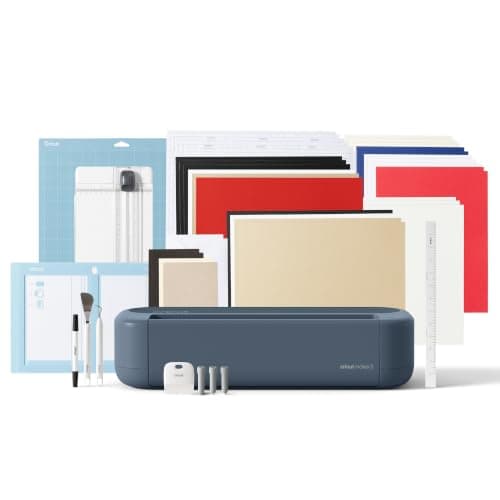 Cricut Maker 5The machine to buy only if you have a specific material in mind that an Explore cannot cut — rotary-blade f... | Leather, properly — the one to buy if you are serious | $399.00 · View on Amazon Price as of November 12, 2026 #ad · affiliate link · we never show a price we cannot verify |
| 2 | 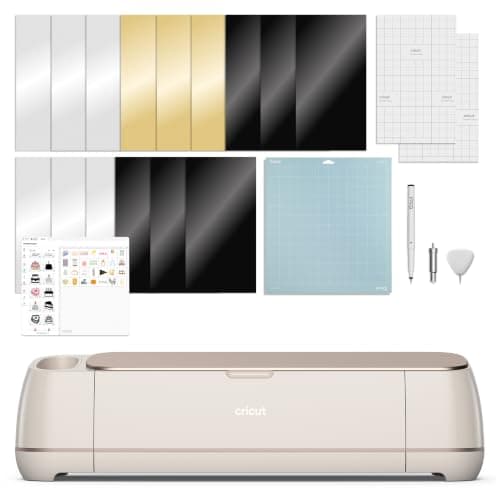 Cricut Maker 4Still sold alongside the Maker 5 and still fully supported — worth a look purely because the older model in... | The same capability, usually for less | $379.00 · View on Amazon Price as of November 12, 2026 #ad · affiliate link · we never show a price we cannot verify |
| 3 | 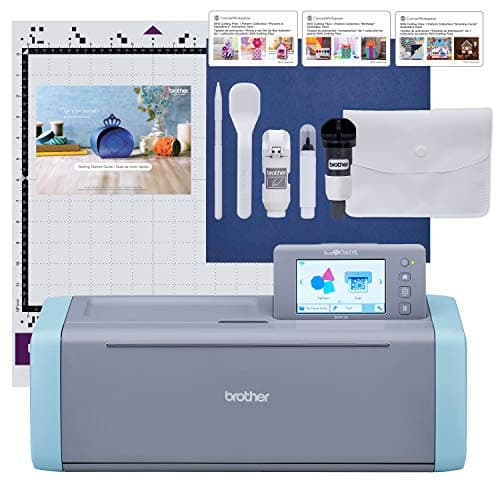 Brother ScanNCut DX SDX125EThe machine for people who do not want to design on a laptop — it has a built-in scanner and touchscreen, s... | Working from a physical pattern | $449.99 · View on Amazon Price as of November 12, 2026 #ad · affiliate link · we never show a price we cannot verify |
| 4 | 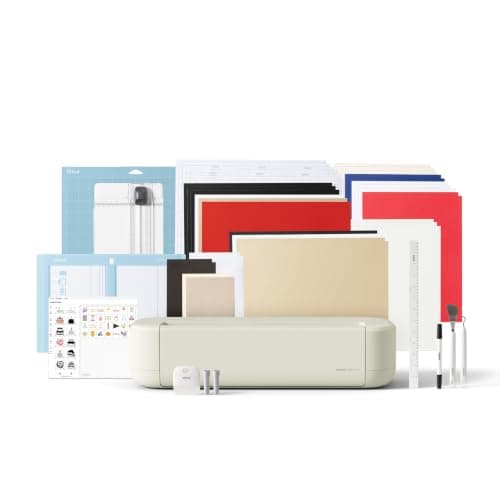 Cricut Explore 5The sensible default for a first machine: it cuts everything a beginner actually uses, and the money you sa... | The budget pick — faux leather only | $249.00 · View on Amazon Price as of November 12, 2026 #ad · affiliate link · we never show a price we cannot verify |
| 5 | 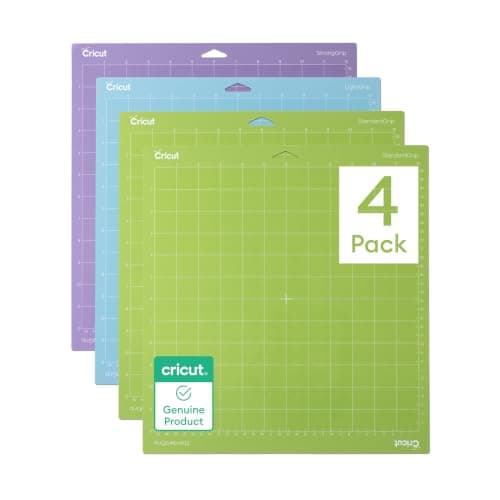 Cricut Cutting Mat Variety PackMats are consumable, not permanent — plan on replacing them, and match the grip to the material rather than... | The consumable leather eats | $17.99 · View on Amazon Price as of November 12, 2026 #ad · affiliate link · we never show a price we cannot verify |
Tap any row to jump to the full write-up. Prices come from Amazon on the date stamped on each button and can change after that — check the listing before you buy.
What to judge a machine on for leather
- Does it take a deep-cut knife blade? This is the gate. A fine-point blade scores leather; a knife blade cuts it. Machines that do not accept one are faux-leather tools, whatever their marketing says.
- How much force can it apply? Leather needs force sustained over multiple passes. This is the specification that separates the Maker-class machines from the Explore-class ones.
- Will the mat hold it? Leather is heavy and the blade drags. A firm mat, and often tape at the corners, is part of the job.
- How thick is your material, really? Measure it. Published machine limits are stated in millimetres, and 'leather' covers everything from 0.3 mm synthetic to 3 mm belt hide — only the thin end of that range is a desktop-cutter material at all.
1. Best for leather, properly — the one to buy if you are serious
Cricut Maker 5
Cricut · Currently sold · Verified 2026-09-27
The right pick because leather is the material where cutting force stops being a marketing number. The Maker's tool system takes a deep-cut knife blade and applies substantially more force than the Explore-class machines, which is what turns a multi-pass score into an actual cut through garment-weight leather. It also takes a rotary blade for the fabric work that usually sits alongside leather projects. Honest cons: thick leather still means several passes, a mat that will be sacrificed, and the fact that no desktop cutter is a substitute for a clicker press on heavy hides.
What works
- Rotary blade cuts quilting cotton with no backing, which no Explore can do
- Knife blade opens basswood, chipboard and thick leather
- Adaptive tool system takes every Cricut blade and tip
- Same matless Smart Material workflow as the Explore line
What does not
- Materially more expensive than an Explore for capability most beginners never use
- The knife blade is a separate purchase on top of the machine
- Knife-blade cuts are slow — a thick basswood cut can run well over an hour
Not for you if
Your project list is shirts, decals, stickers and cards. Every one of those cuts identically on an Explore 5, and the difference in price is roughly a full starter set of materials.
Key specs
- Cuts
- 300+ materials including unbacked fabric, leather, basswood
- Max material width
- 12 in (11.5 in cut width)
- Matless cutting
- Yes, with Smart Materials
- Rotary blade
- Yes — cuts fabric without a stabilizer backing
- Knife blade
- Yes — sold separately
Price as of November 12, 2026
#ad · affiliate link · we never show a price we cannot verify
2. Best for the same capability, usually for less
Cricut Maker 4
Cricut · Currently sold · Verified 2026-09-27
The prior-generation Maker runs the same tool system and the same deep-cut options, which means for leather specifically it does the same job. If the current model is at full price and this one is discounted, the cutting result on leather is not the thing you are paying the difference for. Worth checking both before you choose, which is exactly what the live prices in the table are for.
What works
- Rotary and knife blade capability, the same reason anyone buys a Maker
- Frequently the cheaper route into the Maker line
- Fully supported in Design Space — this is not a discontinued model
What does not
- Slower than the Maker 5 on long cuts
- Being the older model in the line, stock can be patchy
- Same caveat as every Maker: most beginners never use the rotary blade
Not for you if
You are buying your first machine and have no fabric or wood project in mind. The Explore 5 does your projects for less.
Key specs
- Cuts
- 300+ materials including unbacked fabric, leather, basswood
- Max material width
- 12 in (11.5 in cut width)
- Rotary blade
- Yes
- Knife blade
- Yes — sold separately
- Status
- Current line, sold alongside the Maker 5
Price as of November 12, 2026
#ad · affiliate link · we never show a price we cannot verify
3. Best for working from a physical pattern
Brother ScanNCut DX SDX125E
Brother · Currently sold · Verified 2026-10-16
The one genuinely different approach here. Its built-in scanner reads a drawn or printed pattern directly, and it runs standalone without a computer or an account, which suits leather work where you are often copying a template rather than designing on screen. Its blade system auto-adjusts to material thickness. Honest cons: it is not a high-force machine, so treat it as a faux-leather and thin-leather tool, and the software ecosystem is smaller than Cricut's.
What works
- The only mainstream machine that genuinely works without a computer or tablet
- The scanner turns a hand-drawn shape into a cut file directly
- No subscription anywhere in the workflow
What does not
- Canvas Workspace is the weakest of the three design apps
- Much smaller beginner tutorial ecosystem
- Accessory and blade availability is thinner than Cricut's
Not for you if
You are comfortable designing on a computer. The scanner is the main reason to choose this, and you will not use it.
Key specs
- Built-in scanner
- Yes — scans a drawing or printed image and cuts it out
- Standalone operation
- Yes — on-machine touchscreen, no computer required
- Max cut width
- 12 in on the mat
- Software
- Canvas Workspace, plus on-machine editing
- Wireless
- Yes on current models
Price as of November 12, 2026
#ad · affiliate link · we never show a price we cannot verify
4. Best for the budget pick — faux leather only
Cricut Explore 5
Cricut · Currently sold · Verified 2026-09-27
The cheapest machine that does the job, with the limit stated plainly: faux leather, yes; genuine leather, no. Synthetic leather for earrings, tags, bows and keyrings is a thin material and the Explore cuts it cleanly on a firm mat with the right setting. If your 'leather' project is actually a sheet of faux leather from a craft store, this is all the machine you need and the saving is real.
What works
- Cuts every material a beginner's first ten projects will use
- Matless Smart Material cutting means long banners and decals without a mat
- Cheapest current machine that still handles full 12 in wide vinyl
- Huge community of tutorials aimed at exactly this machine
What does not
- No rotary blade, so unbacked fabric is out
- No knife blade for basswood or thick leather
- Still needs Design Space, which needs an internet connection to set up
Not for you if
You already know you want to cut quilting fabric or thick leather. That is the Maker line's rotary and knife blades, and no accessory adds them to an Explore.
Key specs
- Cuts
- Vinyl, heat transfer vinyl, cardstock, paper, iron-on, faux leather
- Max material width
- 12 in (11.5 in cut width)
- Matless cutting
- Yes, with Smart Materials
- Tool slots
- Two — blade plus pen or scoring tool
- Rotary / knife blade
- No — Maker line only
Price as of November 12, 2026
#ad · affiliate link · we never show a price we cannot verify
5. Best for the consumable leather eats
Cricut Cutting Mat Variety Pack
Cricut · Currently sold · Verified 2026-09-27
Leather and faux leather are heavy, grippy and often slightly oily, and they take a toll on a mat — both in adhesive and in the scoring a deep blade leaves behind. Having a firm mat dedicated to leather, separate from the one you use for paper and vinyl, is the difference between a clean cut and a sheet that shifts mid-job. Mats are consumables; plan on replacing them.
What works
- Correct grip prevents both torn material and material sliding mid-cut
- Third-party mats cost noticeably less than brand mats
- Tack can be partly restored with gentle washing
What does not
- They wear out, and a tired mat causes cuts people blame on the machine
- Strong grip can shred thin paper
Not for you if
You only ever cut Smart Materials matless. Even then, keep one standard mat for the day you buy ordinary vinyl.
Key specs
- Grip levels
- Light, standard, strong, and fabric-specific
- Standard grip
- Vinyl, iron-on, cardstock — the everyday mat
- Strong grip
- Thick cardstock, chipboard, glitter materials
- Light grip
- Thin paper and vellum that would tear on a standard mat
- Lifespan
- Consumable — tack declines with use and is partly restorable
Price as of November 12, 2026
#ad · affiliate link · we never show a price we cannot verify
Where a desktop cutter stops
There is an honest ceiling here and it is worth stating before you spend: heavy veg-tan hide, belt leather and anything in the millimetres rather than fractions of a millimetre is not desktop-cutter work. No amount of passes gets you a clean edge, and you will destroy mats and blades finding out. For that material the answer is a die, a clicker press or a laser — and we cover the laser question honestly in Cricut vs laser cutter.
Settings and blades
Use the knife blade for anything beyond faux leather, expect multiple passes, and move the blade depth up gradually rather than starting at maximum. Our blade guide maps blades to materials, and best Cricut machine that does everything is the page for readers whose leather work sits alongside fabric and card.
Prices are read from Amazon automatically with the read date under each button, which is also the quickest way to see whether the prior-generation Maker is currently the better buy.
Common questions
Can a Cricut cut real leather?
Do I need a Maker for faux leather?
Which blade do I use for leather?
How we picked
We verify every product is currently sold by reading the manufacturer's own catalog, compare published specifications rather than marketing copy, and rank on what a first-time buyer has to decide. We do not run lab tests and we do not claim to, and commission never affects the order.
Read this next
Cricut Blade Guide
Which blade cuts what, when to replace, and why a dull blade masquerades as a broken machine.
The Cricut Machine That Does Everything
The Maker 5 is the only Cricut rated for the full material list — here is exactly what that adds, and when it is wasted.
Cricut vs Laser Cutter
Why a laser is not an upgraded Cricut, which materials belong to each, and the safety limit that settles it.
The Best Cutting Machine Under $500
Six registry machines currently priced under $500 across three brands, ranked by what the budget unlocks: material range, software and width.
Cricut Maker 5 Review
The top of the mainstream line: what the extra blades do, and why most beginners will not use them.
Back to Cutting Machines.